
How a Voice AI Call Works
When Voice AI Agent is selected as the handler, who picks up depends on who owns the conversation when the customer calls:
A customer already in conversation with one of your team members always reaches that person. Every other caller gets an instant answer from your Voice AI Agent, at any hour.
When the Voice AI Agent answers:
- The customer taps the call button in your WhatsApp chat.
- The Voice AI Agent picks up straight away. There is no ringing and no waiting for an agent to be free.
- It handles the conversation: answering questions, qualifying the customer, sending messages to the chat, and taking actions you’ve set up for it.
- The call ends.
- A call record is added to the conversation, with a summary, transcript and recording.
- The conversation is assigned, either by the agent itself based on what the customer wanted, or by your Post Call Assignment Rules. See Who Gets the Conversation After the Call.
What the Voice AI Agent Can Do on a Call
Pick up where the chat left off. The Voice AI Agent has the conversation’s chat history as context. If a customer has been chatting with your Chat AI Agent or your team and then taps the call button, the Voice AI Agent knows what’s already been discussed. It continues from there instead of starting over. Send WhatsApp messages during the call. The agent can send messages into the customer’s chat while they’re still talking, so details that are hard to say aloud reach the customer in writing straight away. Assign the conversation based on intent. If you’ve instructed the agent to recognise certain intents and route them to a specific User or Team, it does that as the call ends. See Who Gets the Conversation After the Call. Handle requests for a person. The Voice AI Agent can’t transfer a live call. If a caller asks to speak to someone on your team, the agent:- Tells them it can’t transfer the call right now, but will ask the team to get back to them.
- Asks if there’s a message it should pass on.
- Ends the call and assigns the conversation to a person on your team, who can call the customer back.
Before You Start
- The Advanced plan. Voice AI Agent Calling is part of Advanced. Essential includes human calling only.
- Calling enabled on your WhatsApp number. All the WhatsApp Calling prerequisites apply, including Meta’s eligibility and messaging-limit checks.
- A Voice AI Agent. Build one in AI Agents & Bots before you start.
- At least 200 AI Credits. Below this, the Voice AI Agent won’t answer calls. See AI Credits and Minimum Balance.
Setting Up Voice AI Agent Calling
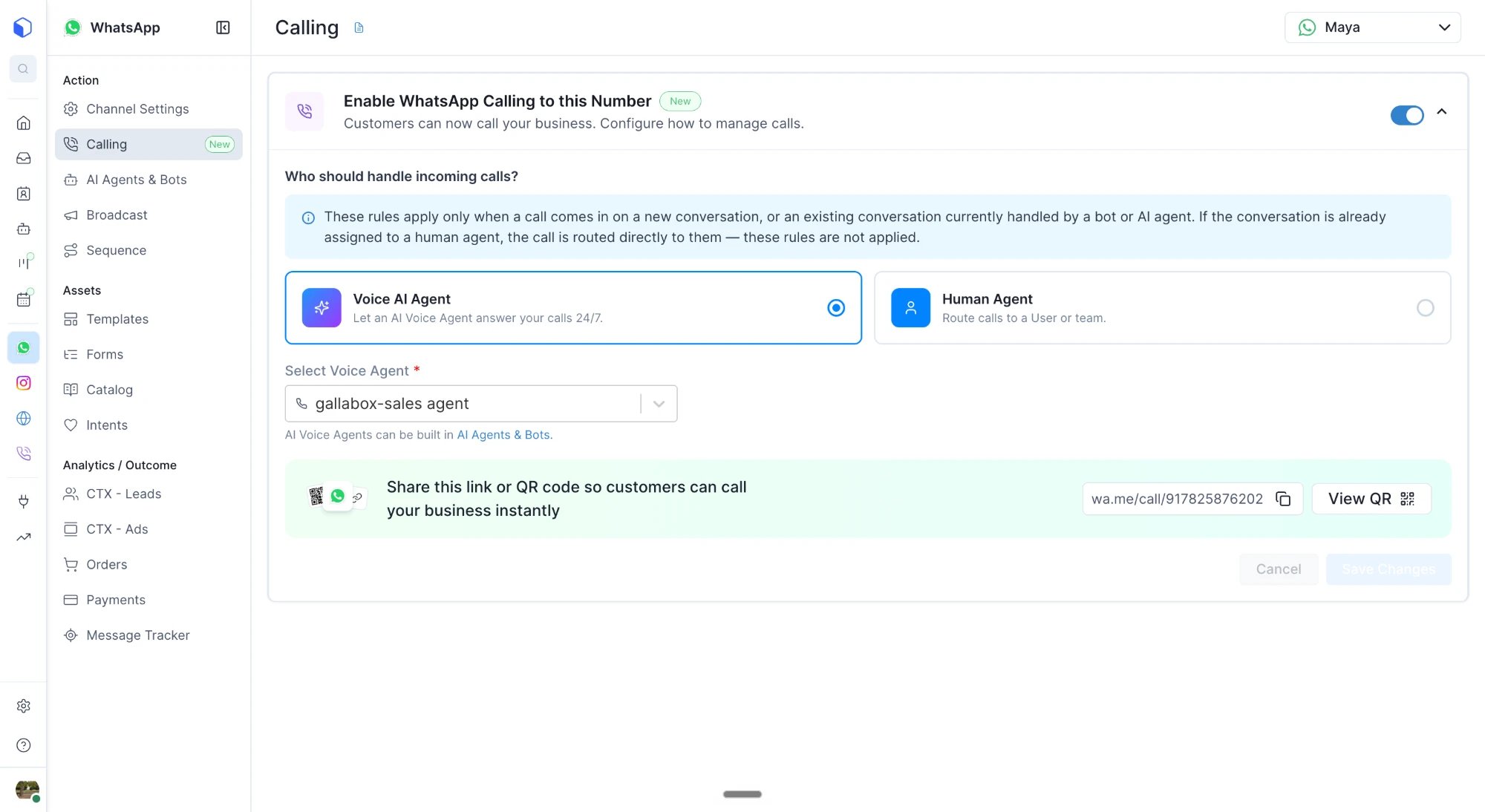
- Go to WhatsApp → Calling in Gallabox.
- Switch on Enable WhatsApp Calling.
- Under Who handles incoming calls, select Voice AI Agent.
- Choose the Voice AI Agent that should answer calls on this number.
- Set your Post Call Assignment Rules (below).
- Save Changes.
Who Gets the Conversation After the Call
When a Voice AI call ends, the conversation is assigned in one of two ways. 1. By the agent, based on intent. If your Voice AI Agent’s instructions tell it to identify certain intents and assign them, for example “send pricing questions to the Sales team” or “send complaints to Priya”, the agent assigns the conversation itself as the call ends. This lets different callers reach different people, based on what they actually wanted. 2. By your Post Call Assignment Rules. If the agent hasn’t been told to assign by intent, or the call doesn’t match any intent you’ve set up, your Post Call Assignment Rules apply. You can assign the conversation to:
Assignment happens when the call ends, not when it starts.
After the Call: What Your Team Sees
Every Voice AI call is saved in the customer’s conversation in your Inbox, alongside their chat history. You’ll find the details on the call card in the conversation and on the Voice AI Agent’s Analyze screen:- The call record: direction, duration, and that it was handled by the Voice AI Agent.
- A summary: what happened on the call, the key details the customer shared, and a suggested next step.
- The transcript: everything said on the call, turn by turn.
- The recording: to listen back to the call.
AI Credits and Minimum Balance
Voice AI calls are charged from your AI Credits, not your Message Credits.
Examples
Credits are charged in fractions, so you only pay for the pulses used, not for a full minute.
What happens below 200 AI Credits. If your balance is under 200 AI Credits when a call comes in, the Voice AI Agent doesn’t answer:
- The call is hung up automatically.
- It’s logged as a missed call.
- The conversation moves to unassigned, so your team can see it and follow up.
Limits to Know
- Incoming calls only. Voice AI Agents don’t place outgoing calls. Your team places outgoing WhatsApp calls. See Outgoing Calls.
- No live transfer. The agent can’t hand a live call to a person. If the caller asks for one, the agent takes a message and assigns the conversation for a callback.
- No Busy Message. The Busy Message is part of human calling only. It isn’t sent for calls handled by the Voice AI Agent, including calls missed because of low AI Credits.
Troubleshooting
A call rang my team instead of the Voice AI Agent. The conversation was already assigned to a person or team, so the call went straight to them. This is expected. The AI only answers calls on new, unassigned, or bot-handled conversations. The Voice AI Agent didn’t answer and the call shows as missed. Your AI Credits balance was most likely below 200. Top up your AI Credits. Also check that:- your account is on the Advanced plan;
- a Voice AI Agent is selected on the Calling page for this number.
Quick Reference
Calling behavior depends on Meta’s WhatsApp Business Calling rules, which may change.